Using AI coding tools for vulnerability research
Published: 2026-03-12
As usual, any information in this post will be obsolete with the release of a new “industry-disruptive” model (which happens every two weeks :)).
Over the past two months, I have been building various AI SAST and DAST prototypes for vulnerability research and bug hunting. I have spent an unhealthy amount of time experimenting with different approaches and tools. This led to the discovery of multiple vulnerabilities in open-source projects such as Mozilla Firefox. As result of my findings, I started to believe that AI could replace at least 40% of the work of a human vulnerability researcher, mainly because it reads code more efficiently than humans do.
I tried different approaches, models, and tools, but spoiler alert: I was not able to build anything better than the default Claude Code. It might be a skill issue, or it may be because nobody has created a better AI security tool than the default Claude with Opus 4.6.
Even though I failed to build anything better, I gained valuable insights into how these tools work and how you can optimize your usage of them.
Prompting
Although prompting might seem like pseudoscience, it is, unfortunately, one of the most important parts of your setup. Even the best current models cannot construct a reasonable threat model. Even in well-known, well-documented codebases like GitLab or Mattermost, the models struggle to differentiate between suspicious-sounding features and actual vulnerabilities.
For a real-world example: if code has a function named is_whitelisted() that can be bypassed, the models will report it as a finding even if allowlisting is a function on the frontend just for backward compatibility. Naming might be misleading, but it’s not a vulnerability.
It is therefore crucial to carefully state the organization’s or project’s threat model and, ideally, provide a prompt such as: Prioritize finding actual vulnerabilities over false positives.
The default ratio of false positives to actual vulnerabilities is about 1 to 50. The best thing is to set up a live instance of the software and instruct the model to always validate and create PoC with simple human steps for each finding. Unfortunately, there will still be a 1-to-10 ratio of false positives to actual vulnerabilities.
Recent papers suggest that using project-level files like AGENTS.md actually makes performance worse. Let the model do its own grepping and reading, and it will learn on its own. Do not explain the source code, because you will probably be worse than the model itself.
Finally, bear in mind that LLMs in general perform better on small, well-defined tasks, so look for past CVEs to describe what the model should look for. Every company releases prompt engineering guidelines for specific models; make sure to review them.
For example:
- https://platform.claude.com/docs/en/build-with-claude/prompt-engineering/overview
- https://developers.openai.com/cookbook/examples/gpt-5/gpt-5-2_prompting_guide/
Context is everything
Understanding the context window is the most crucial aspect of using coding agents. There is a never-ending balance between giving the model enough context to make good output and not overwhelming it with too much information. To see how much context is being used, Claude has a built-in command /context, which shows the current context window.
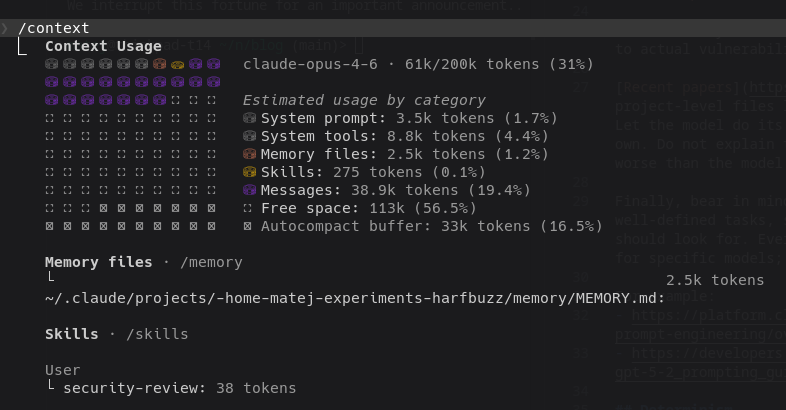
Every MCP, skill, prompt, and chat history takes up space in the context window, which gradually worsens the agent until automatic compact or clear commands are used to reduce the context size. This might delete important information that you added earlier; however, the model did not consider it important enough to keep.
Even if you told the model something, it might still use the wrong part of its memory to back up its claims, leading to bad outputs. This is not often a problem with the model itself, because it reasons based on memory, but memory pollution is a real issue.
For tools that are likely included in the training data, like AFL++ or nmap, the model probably already knows how to use them, so adding an MCP or skill makes it worse. Try not to use skills or MCPs unless you have a good reason.
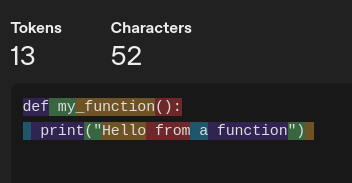
By the way, using less popular languages, like Haskell or Czech, will result in more tokens, since the tokenizer optimizes for the most common patterns in the training data.
For example, Python code translates into 6 tokens:
The Haskell equivalent translates into more tokens, even though it’s shorter:
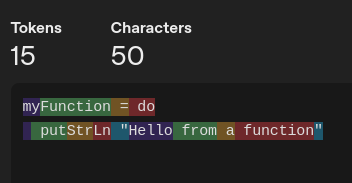
Context has an impact on token usage, so it literally means you pay for using Czech instead of English.
This is relevant not only for security researchers but for any AI practitioner, context management directly affects cost and speed by which models can process information and generate responses.
Determinism
Everybody probably asked themselves why the model always answers differently and maybe you even wondered if you might have missed something because of this.
I thought its randomness was just a result of random seed, however I found out that there is inherent randomness in how models interpret prompts and generate responses. Even with careful prompting, the model may perform differently on the same inputs. I advise letting models run multiple times for more consistent results. Always remember to clear context between runs, because context pollution will lead to regression over the same findings.
For example, I built a tool for finding “interesting” scopes in code that repeatedly runs multiple agents which vote on whether a scope is interesting (read: vulnerable) or not.
Another important aspect to consider when running agents in a loop is memory management. If you are running an agent more than once with the same prompt and clean context, you have to be careful about what the model remembers from previous runs.
Always look out for memory files (such as MEMORY.md) in the repo, because, as statistical models, even if you say “Stack overflows are not considered security vulnerabilities”, the model will still, at best, convolute messages about unnecessary comments on the findings and, in the worst case, will repeatedly output the same findings. If you want to ignore something, remove any memory files from the repo before running the model, and put a very general term in the initial prompt to avoid the whole XYZ class of vulnerabilities.
But be careful with too many negations in the prompt, because the model may do exactly what you’re trying to avoid after a few rounds of context compaction.
Models
I tried ChatGPT, Claude, and other models, but none of them could outperform Opus 4.6 in finding vulns, not even newer GPT 5.4. I am not saying the models are better or worse; I am only saying that Opus was best for vulnerability discovery.
However, not all Opuses are equal; for example, the Opus in Antigravity is much weaker than the one in Claude Code. I heard that the success of Opus can be attributed to Anthropic’s focus on building very good integration with basic tooling like bash and sed, instead of trying to make a cheaper model more usable with fancy tooling like vector indexing. However, reality might be more complex, and only time will tell.
By the way, for searching information, Gemini’s web client with “deep research” is much better than any alternatives, even though Gemini is considered a less capable model compared to others. I guess it makes sense that Google as a company makes great search tools :).
What AI can find
From my experience, AIs detect only well-documented and known classes of vulnerabilities like OWASP Top 10 or memory corruption issues. They worked really well on classes like SSRF, XSS, and buffer overflows. They struggle with vulnerabilities that require more creativity.
For example, I had to manually guide the model to find specific research on particular vulnerabilities like exfiltration of data with CSS fonts. This could be because the techniques are niche and fairly new. However, researchers must keep in mind that although AIs are trained on vast amounts of data, they still do not see attack vectors like a human would.
Cost and manual overhead
I played with GLM 4.7 for agentic small tasks, and created guiderails for this weaker but cheap model; however, when I look back, the time invested in fixing the issues exceeded the cost of using the more expensive model.
And bear in mind that every guiderail you build will eventually be outdated when smarter models get cheaper, do not forget to include time when calculating price :D.
This goes without saying, but the manual overhead is still tremendous. You need to constantly monitor and adjust tasks; it is not an autonomous process at all. Validation may be the biggest portion of manual work for future security engineers, as LLMs will be replacing some parts of traditional vulnerability discovery like code review.
Conclusion
While models like Claude currently excel at some aspects of vulnerability research, they are still limited in their ability to understand the context and threat model of specific projects. Do not rely on them too much; however, completely ignoring AI is not a viable option either.